NOT A CAMOUFLAGE
NOT A CAMOUFLAGE
Alpha's Historical Localisation (V3)
Updated for 1.95 "Northern Wind"
I changed the name, because this is a localisation, after all... It's still the same thing, just with a slightly different name.
This is a Custom Localisation for the game which gives the vehicles in-game more historically correct, and more accurate names. These changes include:
- Allied codenames for Japanese WWII aircraft when encountered in battle
- NATO codenames for post-war Soviet tanks, aircraft and some ships when encountered in battle
- More correct and historically accurate names for ships (USS, HMS, and DKM have been added to ships.)
- Removal of generic ship class names instead of actual ship names, for example, G-class, N-class, Battle-class, Clemson (L45), Clemson (DD-213/336), which have been changed to HMS Grafton, HMS Nepal, HMS Armada, HMS Churchill, USS Barker and USS Litchfield respectively.
- More historically correct names for tanks (ie. M26 Pershing instead of M26, T-34-85 mod. 1943/1944, instead of T-34-85 (D-5T) or T-34-85 respectively.
- AI anti-aircraft guns, and AI anti-aircraft vehicles have also now been assigned names, for example, instead of seeing the generic "AA" unit on the killfeed, it now reads, "Bofors 40 mm, 88 mm Flak 36, etc.
Note. Helicopters and some aircraft are missing their correct names and have been left with their generic/stock names. This is because I have had to reset the localisation and rename everything all again, there was a problem that arose with it. This will be fixed, and I will post a "mini-patch" detailing the corrections.
Updates:
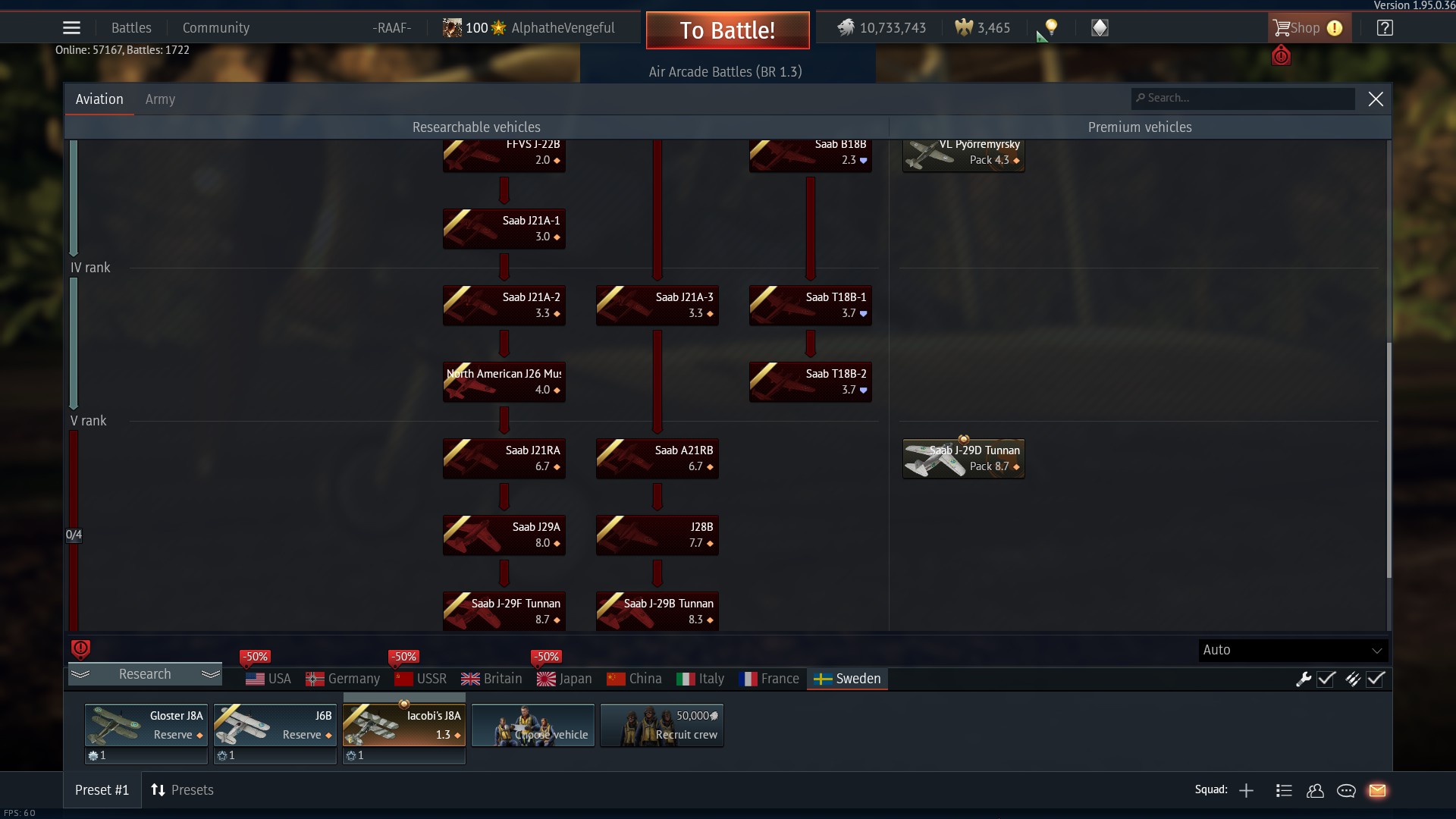
- Most Swedish aircraft have their correct names
- Added the USS Porter, Kawanishi J6K1 Jinpu (Event only), Polikarpov TIS (MA) (Event only), the Merkava (Event only), the MiG-21s, the Dassault Étendard, HMS Brissenden, HMS Calpe, HMAS Tobruk, and various other new vehicles into the file.
How to install this Custom Localisation (If you have never installed a Custom Localisation before):
1. Download the Localisation attached to this post.
2. Find and open where you have installed War Thunder, keep this open, you will need it for later. (For example, on Steam: *Insert drive name here* -> SteamLibrary -> steamapps -> common -> War Thunder
3. In the War Thunder folder, find and open the config.blk file.
4. In the config.blk file, scroll down until you see the line titled, debug{.
5. At the end of that line, paste in, this line, testLocalization:b=yes, and make sure it is in line with all of the other pieces of text in the file, or the localisation may not work properly.
6. Open War Thunder. (You do not need to login, just open the game up to the login screen) Close it once you have opened the game up.
7. In your War Thunder folder, you should now see a folder titled, lang.
8. In the lang folder, drag and drop (Unzip) the attached units.csv file (That is found in the .zip file of the same name) into the lang folder and replace the existing one.
9. Open War Thunder again. If everything has worked, you should see vehicle names appearing as shown in the images attached to this post.
Enjoy! :)
For those that have installed a previous version of my Historical Name Changes Custom Localisation:
1. Download the attached units.zip file.
2. Find where you have installed War Thunder. (For example, on Steam, the install path is: *Insert drive name here* -> SteamLibrary -> steamapps -> common -> War Thunder)
3. In the lang folder of the War Thunder Directory (Where you installed the game), unzip (Drag and drop) the units.csv file that is inside the .zip file of the same name into the lang folder and replace the existing file.
4. Open War Thunder and if it has worked, your vehicle names should be updated, the new vehicles with 1.95 "Northern Wind", as well as pretty much other vehicle should also now be renamed accordingly.
Anybody still waiting for an update on my Immersive UI changes, well, the reason I haven't changed it so far, is because I haven't needed to at the moment, there hasn't been any major UI changes that have needed to be addressed (Unlike with the historical localisation, which needs to be updated every few months. I will update the UI changes very soon, however.
A word for those wondering, this CANNOT get you banned. This custom localisation does not provide you with any gameplay enhancing features, and I did NOT create this historical naming localisation for such a purpose. Localisations such as this are permitted as long as the localisation does not provide you with any gameplay advantages over other players. All this does is change vehicle names to be more historically correct/accurate.
If there are any problems, let me know.
#historical #ww2 #worldwar2 #customlocalisation